Audio and video
Four widgets over one MediaPlayer: the picture, the controls, both together, and a compact player for sound.
By the end of this chapter you can open a file or a URL in a player, show it with its controls from markup or Java, switch tracks and subtitles, and know which codecs a build decodes.
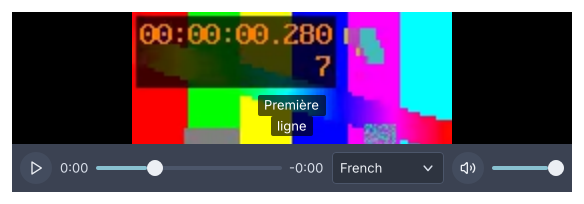
A media-player with a subtitle track chosen, from the module's golden images.
The module
The widgets are in goldberry-media. FFmpeg is driven from Java through the
Foreign Function and Memory API, with no libVLC and no JNI
(ADR-0460). The
natives are published as classifier jars of the same artifact, one per target:
ffmpeg-linux-x64, ffmpeg-linux-aarch64, ffmpeg-windows-x64 and
ffmpeg-macos-aarch64. An application names the ones it ships
(ADR-0495), and
FFmpeg’s source is published beside them as the ffmpeg-sources classifier
(ADR-0508).
Add the stylesheet beside the controls’ own:
var sheets = new ArrayList<>(Controls.stylesheets(theme));
sheets.add(MediaStyles.stylesheet());
The published natives decode royalty-free codecs only: VP8, VP9 and AV1 for
video, and Opus, Vorbis, FLAC, MP3 and PCM for audio. MediaCapabilities.current()
answers what a build decodes and demuxes, read from the loaded libraries.
A player
A MediaPlayer is the application’s. The widgets show and drive it, and never
own it.
import dev.goldberry.media.MediaPlayer;
import dev.goldberry.media.io.Source;

var player = MediaPlayer.builder().build();
player.open(Source.of(Path.of("clip.webm")));
player.play();
open takes a Source.of(path) or a Source.of(uri). Every call returns at
once: the engine runs on its own threads and reports back as a PlayerStatus,
one immutable value with the state, the position, the duration, the tracks, the
volume, the rate and the buffered ranges. player.status() reads the latest and
player.onStatus(listener) hears each change. The transport is play, pause,
seek(position) or seek(position, SeekMode.KEYFRAME), setVolume,
setMuted, setRate from 0.25 to 4 with the pitch following, step(count)
for a picture at a time, and close.
In markup a player is a named object. The application registers it and a node
names it with player=
(ADR-0170):
var named = Named.strict().bind("video.player", player);
var inflater = Widgets.inflater(named, icons, model);
A node with no player to resolve against does not inflate, so the samples below
are fragments and the showcase’s video.kdl and audio.kdl are the complete
documents.
Tracks, subtitles and the network
A source with two voices or two angles offers a track menu, and
player.selectTrack(track) switches over the same frame queue, so the old
picture stays up until the new track’s picture covers the position
(ADR-0467,
ADR-0469).
Text subtitles are read in Java from a SubRip, WebVTT, ASS or MP4 text track, or
from a SubRip or WebVTT file through player.loadSubtitles(source).
hideSubtitles() turns them off and currentSubtitles() is what shows at the
clock
(ADR-0468). Bitmap subtitles
are not built.
A URL is read through a cache and buffered to a high-water mark, which the seek
bar shades, and a live stream’s ICY title is the player’s nowPlaying line
(ADR-0465).
With no audio device, media plays silently
(ADR-0487).
Bringing a codec
H.264, HEVC, AAC, AC-3 and E-AC-3 are not in the published natives. They play
through the operating system’s own decoders, which are DecoderProviders
found by ServiceLoader and consulted before FFmpeg’s
(ADR-0472,
ADR-0493):
| Provider | Codecs | System |
|---|---|---|
videotoolbox, audiotoolbox | H.264, HEVC; AAC, AC-3, E-AC-3 | macOS |
gstreamer-video, gstreamer-audio | The same, with the decoders installed | Linux (ADR-0489) |
mediafoundation-video, mediafoundation-audio | The same | Windows, written and not yet run there |
An application brings its own codec the same way: implement DecoderProvider
with name, supports(request) and open(request), and declare
provides dev.goldberry.media.codec.DecoderProvider with … in its module. A
provider for a patented codec holds the licence for it.
MediaPlayer.builder().decoderProviders(list) lists providers by hand, and
PlatformDecoders.providers() is the system’s set.
Hardware decoding is a rung of the built-in decoder: on by default on macOS and
Windows, switched with setHardwareDecoding(HardwareDecoding.AUTO) or OFF,
and applied from the next source opened
(ADR-0470).
media-player
A video-view with media-controls laid over its foot: the picture, the
transport, the error, the stream’s title and the subtitles in one box.
media-player id="video-player" player="video.player" fit="contain"
import dev.goldberry.media.view.MediaPlayerView;

new MediaPlayerView(player);
new MediaPlayerView(player, Fit.COVER, Attributes.NONE.id("video-player"));
The controls hide while the player plays and the pointer rests, 2.5 seconds
after it last moved, and come back when it moves. A click on the picture plays
or pauses. A failure is shown over the picture in .media-error, and an H.264
file says which codecs it could not play. Subtitles are lines over the foot of
the picture, above the controls while they show and lower while they hide. F
asks the window to fill its display, and a copy of the player covers the window
with the class is-fullscreen
(ADR-0473).
Attributes
| Attribute | Type | Default | What it does |
|---|---|---|---|
player | named MediaPlayer | required | The player to show and drive |
fit | contain, cover, fill, none | contain | How a picture fills a box of another shape, as on image |
id | string | none | The player’s id |
class | string | none | Classes on its box |
Children are refused.
Styling
The CSS type is media-player, a column with min-height and the backdrop
--gb-media-backdrop. Inside it are the video-view, the .media-overlay
column pinned to the bottom, media-controls in that, .media-error,
.media-now-playing, .media-subtitles and .media-subtitle. The state is on
the root as .is-idle, .is-opening, .is-buffering, .is-playing,
.is-paused, .is-ended or .is-error, with .is-scrubbing while the seek
bar is held, .is-pointer-idle while the controls hide, and .is-fullscreen on
the full-window copy. The tokens are --gb-media-*, and media.css fades the
overlay on .is-pointer-idle.
Keyboard
Once the player has focus: Space or K plays and pauses, Left and Right
seek five seconds, Up and Down change the volume by five percent, M mutes,
Home goes to the start, , and . step a picture back and on, < and >
slow down and speed up through 0.25 to 2, and F and Escape enter and leave
fullscreen.
Read more
- ADR-0463: Video is converted as it is decoded and paced by the picture
- ADR-0468: Text subtitles are read in Java
- ADR-0473: A window is fullscreen when the platform says so
video-view
A player’s pictures and nothing else: the surface for an application that draws its own controls or none.
video-view player="trailer" fit="cover"
import dev.goldberry.media.view.VideoView;

new VideoView(player);
new VideoView(player, Fit.COVER);
The view follows the player’s status. A picture a paused seek lands on is shown
when it is ready, and while the player plays it draws a new picture every frame.
With goldberry-gpu on the module path the pictures go through a GPU layer, and
a shader converts them from their planes with the stream’s matrix and range
(ADR-0484).
Without it, or where the layer cannot be placed, the view draws converted
pictures on the CPU.
Attributes
| Attribute | Type | Default | What it does |
|---|---|---|---|
player | named MediaPlayer | required | The player to show |
fit | contain, cover, fill, none | contain | How the picture fills the box. The picture is centred |
id | string | none | The view’s id |
class | string | none | Classes on its box |
Children are refused.
Styling
The CSS type is video-view. It has no size of its own and grows into what it
is given, with flex-grow: 1 and --gb-media-backdrop where the picture does
not reach.
Keyboard
None of its own. Put a media-controls beside it.
Read more
- ADR-0483: Video pictures wait as planes for a view that uploads them
- ADR-0484: video-view shows its pictures through a GPU layer when gpu is present
- ADR-0485: The audio clock never jumps and 4K60 plays every picture
audio-player
Compact controls over a player: play and pause, the times, a seek bar, mute and volume, with the stream’s title above and an error below.
audio-player id="audio-player" player="audio.player"
import dev.goldberry.media.view.AudioPlayer;

new AudioPlayer(player);
The seek bar is left out for a source that cannot seek, and a LIVE label
stands in its place for a stream. While playing, the widget reads the position
four times a second.
Attributes
| Attribute | Type | Default | What it does |
|---|---|---|---|
player | named MediaPlayer | required | The player to show and drive |
id | string | none | The player’s id |
class | string | none | Classes on its box |
Children are refused.
Styling
The root carries the class audio-player, and its pieces media-play,
media-time, media-seek, media-live, media-rate, media-mute,
media-volume, media-now-playing and media-error. The state is on the root
as is-playing, is-paused, is-buffering, is-ended or is-error.
Keyboard
As media-controls, without the picture keys.
Read more
- ADR-0462: Media audio leaves through a sink and SDL
- ADR-0465: Network media is read through a cache and buffered to a high-water mark
- ADR-0474: The audio clock is what is heard
media-controls
The transport bar on its own, for an application that lays it out itself under a
video-view or drives a player it shows elsewhere.
column {
    video-view player="trailer"
    media-controls player="trailer"
}
import dev.goldberry.media.view.MediaControls;

new Column(List.of(new VideoView(player), new MediaControls(player)), Attributes.NONE);
Play and pause, the elapsed and remaining times, a seek bar that scrubs to keyframes while dragged and lands exactly on release, mute, volume, the rate when it is not 1, and the audio, video and subtitle menus where the source has a choice. All of it is built from the ordinary controls, so it takes the theme and the focus like any other.
Attributes
| Attribute | Type | Default | What it does |
|---|---|---|---|
player | named MediaPlayer | required | The player to drive |
id | string | none | The bar’s id |
class | string | none | Classes on its box |
Children are refused.
Styling
The CSS type is media-controls, a row with --gb-media-gap. Its pieces carry
media-play, media-time, media-seek, media-live, media-rate,
media-mute, media-volume, media-audio-track, media-video-track,
media-subtitles-menu and media-fullscreen. The state is on the bar as
is-playing, is-paused, is-buffering, is-ended or is-error, and
is-scrubbing while the seek bar is held.
Keyboard
The bar is a focus stop. Space or K, Left and Right, Up and Down,
M, Home, , and ., and < and >, as on media-player. A key bubbles
to the bar from a control inside it that does not want it.