Markdown, HTML and the web
A Markdown note and an HTML page render as ordinary widgets under the ordinary cascade, and a web page is a window the desktop's own engine draws where the window system allows one.
By the end of this chapter you can show a document that follows a property, answer its links and task boxes, let a reader select and copy from it, and decide whether a real web page can be offered on the machine you are on.
The two views are in the goldberry-html module. Add it beside the toolkit and
add its stylesheets beside the controls’ own, or a document renders as unstyled
words:
var sheets = new ArrayList<>(Controls.stylesheets(theme));
sheets.add(MarkdownStyles.stylesheet());
sheets.add(HtmlStyles.stylesheet());
Nothing in the core knows the module exists. Its catalogue announces the two node names, and the inflater finds them when the module is on the module path (ADR-0131).
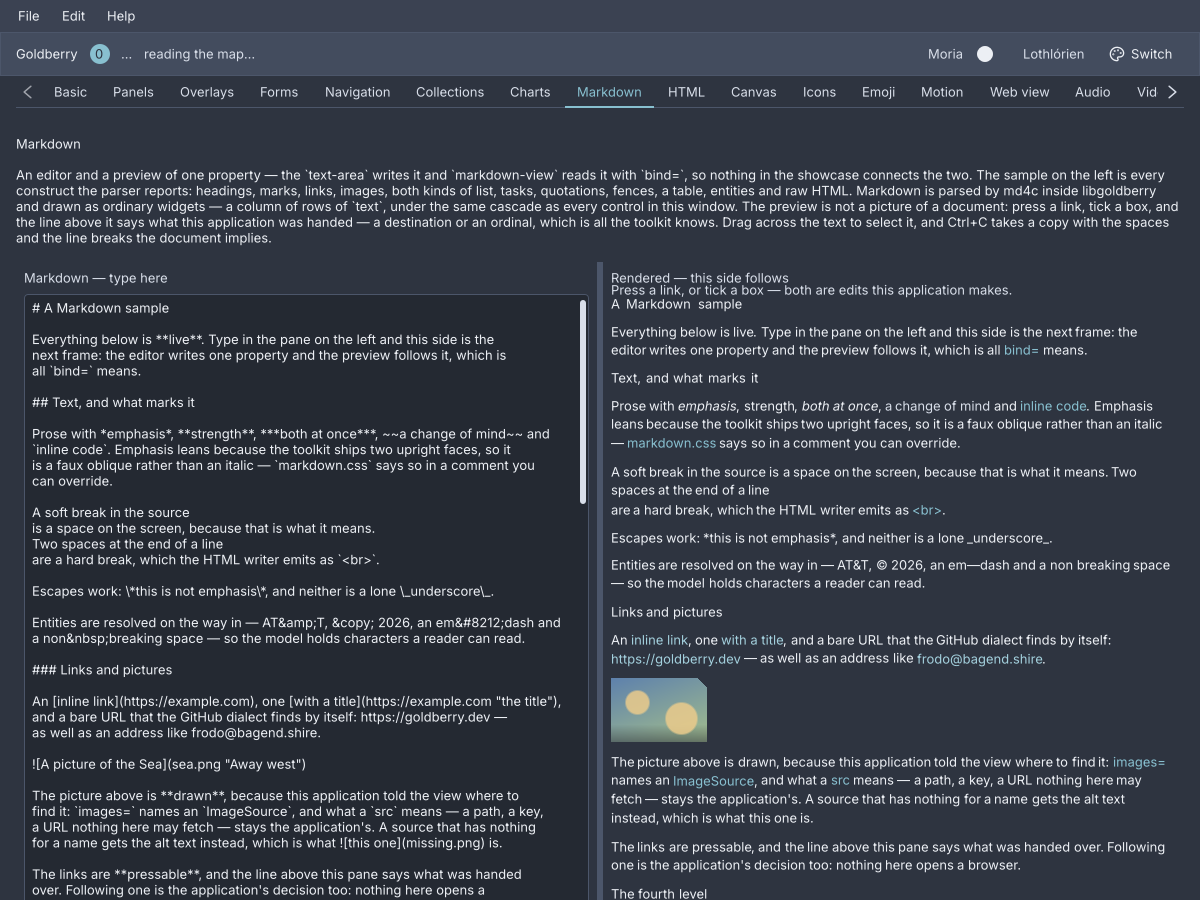
The showcase's Markdown screen. The editor writes one property and the view reads it.
markdown-view
A rendered Markdown document: GitHub’s dialect by default, parsed by md4c and
folded into column, row and text.
split-pane position=0.5 first-min=240 second-min=240 {
    text-area class="mono" bind="note.source" change="note.set-source" fill=#true
    scroll {
        markdown-view bind="note.source" link="app.open" wikilink="app.open-page" images="app.assets" task="note.toggle-task"
    }
}
import dev.goldberry.markdown.Markdown;
import dev.goldberry.markdown.view.MarkdownView;

var view = MarkdownView.following(model.source())
        .onLink(app::open)
        .onWikiLink(app::openPage)
        .images(assets)
        .onTask(index -> model.setSource(Markdown.toggleTask(model.source(), index)));
A live preview is a binding. The editor writes note.source through its action
and the view reads the same property with bind=. Nothing watches the editor
or schedules a render: a keystroke marks the view for rebuild and the next frame
is the parsed document
(ADR-0296). A block
whose source did not change keeps the widget it had, so a keystroke on a 50 kB
note costs about 2 ms of build
(ADR-0389).
Markup may also carry the document as the node’s argument. syntax picks the
dialect, and a view with a document and a binding shows the document until the
property answers.
markdown-view "A *little* document." syntax="commonmark"
In Java a Document is a value: Markdown.parse(text) or
Markdown.parse(text, MarkdownSyntax.commonMark()) returns a sealed tree an
application can walk for an outline before handing it to
MarkdownView.of(document). MarkdownView.of(text) parses for the caller who
wants a preview and nothing else. MarkdownHtml.of(document) writes the same
tree out as an HTML fragment, so a preview and the bytes a server hands out
cannot drift
(ADR-0295).
Links, images and tasks
A rendered document is read, and the application answers
(ADR-0300).
A link is a button.link, a Tab stop that hands its href to link= and does
nothing else: no browser opens and no path resolves. A [[wiki link]] hands its
target to wikilink=, and a view with no handler draws it inert. An image is
its alt text until an ImageSource the application supplies turns the src
into pixels. A task box reports its ordinal to task=, and
Markdown.toggleTask(source, index) flips that one character of the source.
The ordinal crosses as the string a document would have written.
Selection
Drag across the document, double-click a word, triple-click a block, Ctrl+A
and Ctrl+C. What lands on the clipboard has the space between words and the
newline between blocks that the document implies
(ADR-0301).
Nothing to switch on. A drag repaints rather than rebuilds.
Attributes
| Attribute | Type | Default | What it does |
|---|---|---|---|
| argument | string | "" | The Markdown source, shown until bind answers |
bind | binding | none | A property whose text is parsed on every build |
syntax | github, commonmark | github | The dialect. Anything else is refused |
link | valued action | none | Handed a link’s href |
wikilink | valued action | none | Handed a wiki link’s target |
images | named ImageSource | none | Where an image’s src becomes pixels |
task | valued action | none | Handed a task box’s ordinal, from zero |
id | string | none | The view’s id, on the column it builds |
class | string | none | Classes on that column |
Children are refused. There is no src= to read a file with, because a widget
reading the filesystem during inflation is a decision not yet taken.
Styling
markdown-view composes and has no box of its own. It builds a column with
the class markdown, and markdown.css hangs every rule off a class: md-h1
to md-h6, md-prose, md-line, md-lines, md-token, md-word, md-em,
md-strong, md-struck, md-underline, md-code, md-code-block,
md-code-line, md-code-language, md-link, md-wikilink, md-list,
md-item, md-item-body, md-marker, md-quote, md-quote-body, md-table,
md-row, md-cell, md-rule and md-raw. A link is a button with the class
link. The sheet is in the toolkit’s base layer, so an application’s rule wins
without !important.
Keyboard
Tab reaches each link, and Space or Enter presses it. Ctrl+A selects the
document and Ctrl+C copies the selection.
What it does not do
Emphasis is a faux oblique, a skew rather than an italic face. A line of mixed
faces is a row of words rather than one shaped run, so there is no
justification and no hyphenation. The view is not scrollable, because scroll
exists and the choice of where the scrollbar goes is the application’s.
Read more
- ADR-0293: A button that reads as a link
- ADR-0294: A parser crosses the boundary once
- ADR-0295: A document is a value and a paragraph is a row of words
- ADR-0296: A preview is a binding, not a callback
- ADR-0300: A document is read and the application answers
- ADR-0301: A selection is geometry the frame already had
- ADR-0389: A block nobody typed in keeps its widget
html-view
A rendered HTML document: parsed in Java into a model of records and folded into the same widgets the Markdown view uses.
scroll {
    html-view bind="doc.source" link="doc.open" images="app.assets"
}
import dev.goldberry.html.Html;
import dev.goldberry.html.view.HtmlView;

var document = Html.parse(help.body());
var view = HtmlView.of(document).onLink(app::navigate).images(assets);
var links = document.find("a");
HtmlView.following(model.source()) is the Java spelling of bind=, and
HtmlView.of(text) parses for a caller who wants a page and nothing else. The
document may also be the node’s argument:
html-view "<p>A <em>little</em> page with <a href=\"/help\">a link</a>.</p>" link="doc.open"
An anchor becomes a button.link that hands its href to link=. It is a Tab
stop, it hovers and it takes Space and Enter, so a help page is navigable
from the keyboard. Whether the link may be followed is the application’s: no
browser opens, no relative path resolves and nothing is fetched
(ADR-0298). Selection
and copy work as in the Markdown view.
Attributes
| Attribute | Type | Default | What it does |
|---|---|---|---|
| argument | string | "" | The HTML source, shown until bind answers |
bind | binding | none | A property whose text is parsed on every build |
link | valued action | none | Handed an anchor’s href |
images | named ImageSource | none | Where an <img src> becomes pixels. Without one an image is its alt text |
id | string | none | The view’s id, on the column it builds |
class | string | none | Classes on that column |
Children are refused, and there is no src=.
Styling
html-view builds a column with the class html. Every element contributes
the class html-<tag>, so html.css reads like a browser’s default sheet and a
tag nobody anticipated is already styleable. A page’s own class="callout"
arrives as html-callout. The structural classes are html-block, html-prose,
html-line, html-lines, html-token, html-word, html-list, html-item,
html-item-body, html-marker, html-table, html-row, html-cell,
html-caption, html-quote, html-quote-body, html-pre, html-code-line,
html-rule and html-term. Headings are html-h1 to html-h6.
Keyboard
As markdown-view: Tab to each link, Space or Enter to press it,
Ctrl+A and Ctrl+C for the selection.
What it does not do
There is no engine behind it. No scripting, no network, no navigation and no
forms. A <style> block is kept in the model and applied by nothing, because
the cascade a page is under is the application’s stylesheets, which is what
makes it follow the theme. Real inline layout, one shaped run across mixed
faces, is what an engine would buy and is not built.
Read more
- ADR-0293: A button that reads as a link
- ADR-0298: HTML is a document and not an engine
- ADR-0300: A document is read and the application answers
- ADR-0301: A selection is geometry the frame already had
The web view
A real web page inside the window, drawn by the desktop’s own engine into a child window placed over the widget’s box. Java only: there is no markup name, because a page is a platform handle a document cannot describe.
import dev.goldberry.widgets.core.web.WebView;
import dev.goldberry.widgets.shell.web.WebPage;

new WebView(WebPage.of("https://goldberry.dev")).withAttributes(Attributes.NONE.id("page"));
A WebPage is a value: WebPage.of(url), WebPage.ofHtml(html) or
WebPage.blank(), with title, sized, debug for the engine’s inspector,
and on(name, callback) for a function the page’s own script can call. The
widget follows the page it is handed, so navigating is rebuilding with another
page
(ADR-0449). A
callback’s return value resolves the page’s promise and an exception rejects it
(ADR-0448).
var page = WebPage.ofHtml(DEMO)
        .on("goldberrySays", arguments -> "\"Java heard you\"");
WebViews.open(host, page) opens a page in a window of its own instead, and
returns empty where no page can be opened.
Ask before offering one
The engine is WebKitGTK, WebView2 or WKWebView, driven through a separate optional library so that GTK and WebKit are never load-time dependencies of the toolkit (ADR-0441). Most machines cannot open a page, so an application asks first:
if (Goldberry.capabilities().contains(Capability.WEB_VIEW)) {
    return new WebView(WebPage.of(HANDBOOK));
}
return new Button("Open the handbook", () -> Desktop.browse(HANDBOOK));
WebViews.isAvailable() is the same question.
| Platform | What the page is | Status |
|---|---|---|
| X11, and XWayland | A GTK window reparented into this one | Works |
| macOS | A WKWebView, a subview of the window’s content view | Works (ADR-0458) |
| Windows | A WebView2 child window | Written, unverified |
| Wayland | Nothing | Refused, and says why |
Wayland refuses it
Embedding means putting the engine’s window inside the application’s. Wayland
does not allow a client to reparent a foreign surface, and no protocol proposes
it. On a Wayland session the widget opens nothing and paints a message saying
why, rather than dropping a loose window on the desktop
(ADR-0442).
An application that wants a page there can ask SDL for the X11 driver with
-Dgoldberry.backend.videoDriver=x11, which runs the window under XWayland.
What a page cannot share the screen with
The page is a window above the frame, not a raster in it. Nothing painted can
cover it: a popover, a tooltip or a toast that overlaps the page is
invisible where they meet. A scroll does not clip it. opacity, transform
and the frost material do not reach it. No golden image contains one. A dialog
is the exception: while a modal is up the widget parks its page off the side of
the window and brings it back when the dialog closes
(ADR-0444). A page is also
opened parked and shown only once it reports itself loaded, with a spinner in
its box until then
(ADR-0445).
Input is the page’s. The window system delivers clicks and keys to the engine directly, and on macOS the backend drops key events while a page holds the keyboard (ADR-0459). Under X11 a window keeps presenting through the GPU with a page in it (ADR-0491). A page is taken down on WebKit’s thread, and its context outlives the application’s exit (ADR-0507).
Styling
The widget builds a column with the class web-view, a stack with the
class web-stage, and a canvas with the class web-surface that carries the
id and sizes the page. All three default to flex-grow: 1, so a page fills the
box it is given. The page’s own document is not in the toolkit’s tree, so no
stylesheet or theme reaches it. An application that wants a page to follow the
desktop’s light or dark setting reads Host.systemTheme() and writes the CSS.
Keyboard
The page’s own. The toolkit forwards nothing.
Read more
- ADR-0441: A web page is a window, not a box
- ADR-0442: A page is a child window where the window system allows one
- ADR-0444: A page stands aside for a modal
- ADR-0445: A page is not shown before it can be seen
- ADR-0448: A page calls back through a name it was given
- ADR-0449: A page follows the value that describes it
- ADR-0507: A page is taken down on WebKit’s thread and its context outlives exit