Canvas, images and QR codes
A canvas is the surface an application draws on itself, an image shows a decoded picture, and a QR code is a payload drawn as modules of whole device pixels.
By the end of this chapter you can draw with paths, strokes, gradients and
images on a canvas, hear the pointer and the keyboard on it, place a picture
with one of four fit modes, and put a scannable code in a dialog.
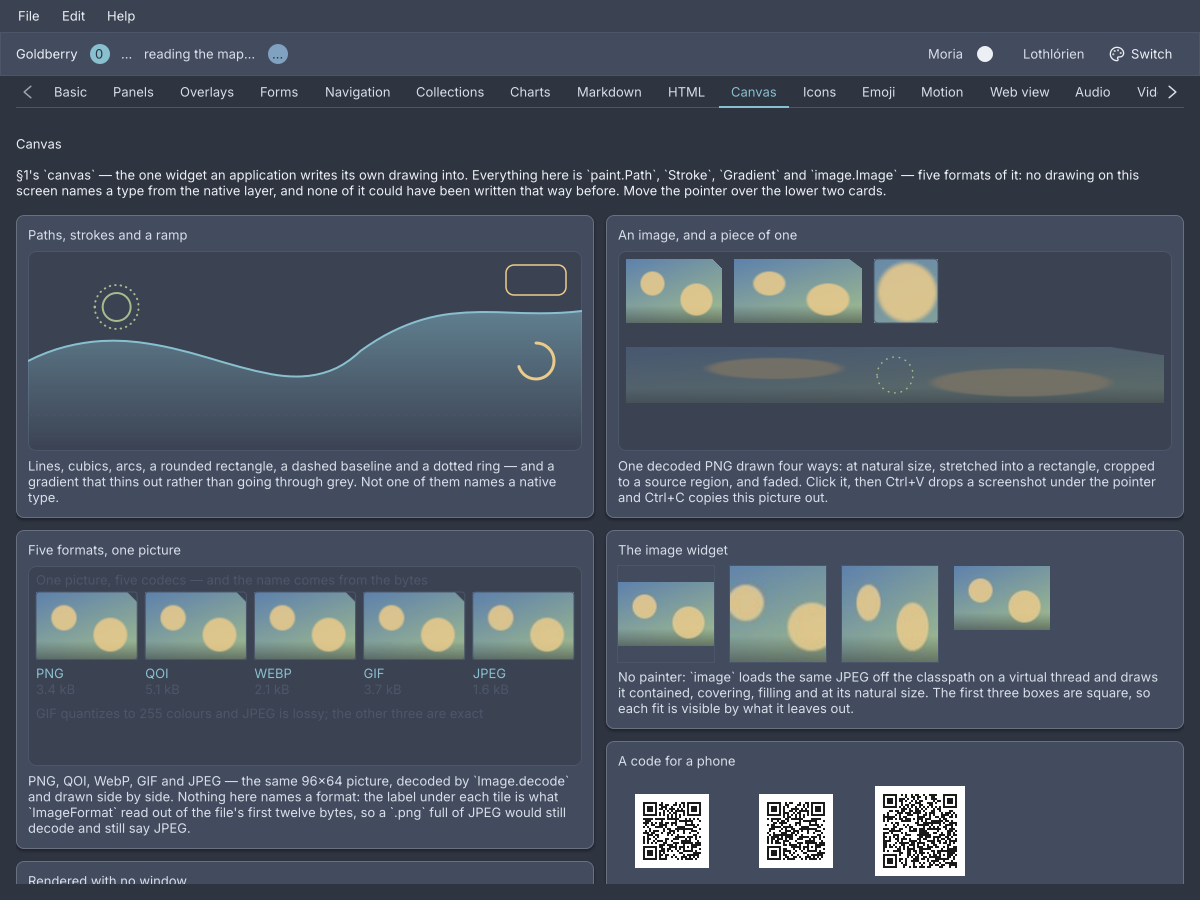
The showcase's Canvas screen. The drawings are a canvas each, the four photographs on the right are image widgets, and the three codes are qr-code.
canvas
An immediate-mode drawing surface: a box whose painter is handed the frame, translated to the box’s content corner and clipped to it.
canvas id="plot" class="chart"
import dev.goldberry.widgets.core.canvas.Canvas;

new Canvas((frame, size) -> {
    frame.fillRect(0, 0, size.width(), size.height() / 2, 0xFF88C0D0);
}, Attributes.NONE.id("plot").classes("chart"));
Markup names no painter. A canvas node inflates to a styled, sized surface
that draws nothing, because a painter is code and a document names things
rather than building them. The painter is Java.
The painter
A Painter is paint(Frame frame, LogicalSize size). The frame’s origin is the
canvas’s top-left and the clip is its content box, so a painter cannot escape
its bounds. The toolkit brackets the call in save and restore, so a painter
may set a clip or a transform and leave it set
(ADR-0193). It runs on the UI
thread inside the frame, so it must not block and must not keep the frame.
var hill = Path.builder()
        .moveTo(0, height)
        .lineTo(0, height * 0.55)
        .cubicTo(width * 0.25, height * 0.2, width * 0.45, height * 0.9, width * 0.6, height * 0.5)
        .lineTo(width, height)
        .close()
        .build();
frame.fillPath(hill, Gradient.fade(0, height * 0.2, 0, height, CssColor.fade(ink, 0.55)));
frame.strokePath(Path.circle(cx, cy, 14), Stroke.round(2), accent);
frame.strokePath(Path.line(0, y, width, y), Stroke.of(1).dashed(4, 4), muted);
frame.drawImage(logo, 16, 16);
Frame fills and strokes a Path, with a colour or a Gradient, draws an
Image at its natural size or scaled and faded, clips with clipTo, and
transforms with transform, concat and resetTransform. Path has a builder
with moveTo, lineTo, quadTo, cubicTo, arcTo, close and append,
and factories line, polyline, rect, roundRect, ellipse, circle and
arc. A path is a value, so path.rotated(radians, cx, cy),
translated, scaled and transformed(affine) make a turned copy, and
frame.concat composes a transform onto the one the canvas already has
(ADR-0390).
A Stroke is of(width) or round(width), with cap, join, dashed(on, off)
and dash(Dash). A dash is the toolkit’s own arithmetic
(ADR-0278).
A three-parameter painter is a StyledPainter and is handed a CanvasStyle:
the node’s resolved font and ink, this frame’s nowMillis, and
reducedMotion. So canvas { color: var(--gb-text) } reaches the drawing
(ADR-0288).
new Canvas((frame, size, style) -> {
    Paragraph.of(style.font(), "Revenue").paint(frame, 0, 0, size.width(), style.ink());
});
A canvas is painted once and left there. animating asks for the next frame
for as long as a predicate over the same CanvasStyle says so
(ADR-0348):
new Canvas(floor::paint).animating(style -> style.nowMillis() - mounted < SETTLE_MILLIS);
Input
An Input beside the painter makes the canvas hear the pointer and the keyboard.
The events are the toolkit’s own PointerEvent and KeyEvent, and
event.content() is measured from the corner the painter draws at
(ADR-0281).
new Canvas(board::paint, new Input() {
    @Override
    public void onPointer(PointerEvent event) {
        var at = event.content();
        switch (event.kind()) {
            case PRESSED -> board.beginDrag(at.x(), at.y());
            case MOVED -> board.dragTo(at.x(), at.y());
            case WHEEL -> board.zoom(event.deltaY(), at.x(), at.y());
            default -> { }
        }
    }
});
A drag that leaves the canvas keeps reporting, because the router captures the
pointer on press. event.consume() keeps a wheel from scrolling the pane the
canvas sits in. onKey, onText and onPreedit arrive when the canvas has
focus, and wantsText() turns the platform’s input method on for a canvas that
holds an Editor. accessibleName() names the figure for a reader.
Attributes
| Attribute | Type | Default | What it does |
|---|---|---|---|
id | string | none | The canvas’s id |
class | string | none | Classes on its box |
Styling
The CSS type is canvas. It is a box first: background, border,
border-radius, padding, width, height and every layout property are the
stylesheet’s, and the painter draws inside the padding. A canvas has no size of
its own, so one in a row with nothing to size it is zero wide. cursor works
as on any box. Its role is figure.
Keyboard
A canvas is focusable exactly when it has an Input whose focusable() is
true. Keys reach onKey. A canvas with no input is not a Tab stop.
Read more
- ADR-0193: A canvas is a second clip depth
- ADR-0277: A path is a value and the rasterizer’s is package-private
- ADR-0281: A canvas hears what it draws on
- ADR-0288: A painter is told what the cascade resolved
- ADR-0348: A canvas asks for its next frame with what it was painted with
- ADR-0390: A turned shape is a path and the frame can compose
image
A picture, loaded off the frame on a virtual thread and drawn at its natural size until a stylesheet says otherwise.
column {
    image src="photos/harbour.jpg" alt="The harbour at dusk" fit="cover"
    image srcset="classpath:logo.png 1x, classpath:logo@2x.png 2x" alt="Goldberry"
    image src="classpath:divider.png" decorative=#true
}
import dev.goldberry.widgets.core.image.ImageView;
import dev.goldberry.widgets.core.image.ImageSource;
import dev.goldberry.widgets.core.image.Fit;

new ImageView(ImageSource.file(path), "The harbour at dusk").fit(Fit.COVER);
new ImageView(ImageSource.resource(App.class, "logo.png"), "Goldberry").variant(2, ImageSource.resource(App.class, "logo@2x.png"));
ImageView.decorative(ImageSource.resource(App.class, "divider.png"));
An ImageSource is a file(path), a resource(anchor, name), bytes(data),
an Image already decoded with of(image), or supplied(key, supplier) for a
thumbnail generator or an HTTP fetch run on a virtual thread. The shared loader
decodes each source once per process, so ten thumbnails of one file decode
once. While the pixels are on their way the box carries .loading. When they
cannot be decoded it carries .error and shows Lucide’s image-off with the
alt text
(ADR-0358).
The record is ImageView. The Java name differs from the markup name because
Image is the decoded value in dev.goldberry.image, which an application
holds, pastes and encodes without a widget
(ADR-0283).
The format comes from the bytes: PNG, JPEG, QOI, WebP and GIF decode, and an
animated GIF decodes to its first frame
(ADR-0329).
Important
An image needs
alttext ordecorative=#true, and is refused when it has neither. A picture a reader is told is a figure and nothing more is worse than one they are not told about.
Fit modes
fit | What is drawn |
|---|---|
contain | The whole image, as large as fits, letterboxed. The default |
cover | The box filled, the image cropped to the box’s shape |
fill | The box filled, the image stretched to its shape |
none | The image at its natural size, centred, cropped if larger |
The image is always centred. cover crops rather than clips, so it needs no
overflow: hidden and cannot paint over a neighbour.
Attributes
| Attribute | Type | Default | What it does |
|---|---|---|---|
src | string | none | One path. classpath: names a resource on the application’s class loader. Exactly one of src and srcset is required |
srcset | string | none | Several paths with scales: logo.png 1x, logo@2x.png 2x |
alt | string | "" | What the picture shows, for a reader. Required unless decorative |
decorative | boolean | #false | The picture shows nothing a reader needs, and leaves the semantics |
fit | contain, cover, fill, none | contain | How the picture fills a box of another shape. A misspelt value is refused |
id | string | none | The image’s id |
class | string | none | Classes on its box |
Styling
The CSS type is image. With no width and height the box is the picture’s
natural size, one image pixel per device pixel, and max-width shrinks it in
proportion. With one of them the other follows the picture’s shape. With both,
fit decides. The classes loading and error are added while a load stands
there, and image-alt is the part that shows the alt text on failure.
Keyboard
None. An image is not focusable.
Read more
- ADR-0283: An image is a value
- ADR-0329: Two more codecs, one fetched and one written
- ADR-0358: An image loads off the frame and is its own size
- ADR-0385: WebP is written and animated
An SVG does not decode. It is routed to a goldberry-vector module that does
not exist, and shows the error state.
qr-code
A QR code for a payload, drawn in modules of whole device pixels so a phone camera reads it at any scale.
qr-code value="https://goldberry.dev" level="M" quiet-zone=4 name="Scan to open goldberry.dev"
import dev.goldberry.widgets.core.qrcode.QrCode;
import dev.goldberry.image.qr.Level;

new QrCode("https://goldberry.dev").level(Level.H).withAttributes(Attributes.NONE.name("Scan to open goldberry.dev"));
new QrCode(link, Level.L, 4, Attributes.NONE.id("qr-low"));
The encoder is the toolkit’s own, in dev.goldberry.image.qr beside the image
codecs, and QrEncoder.encode(payload, level) returns the same QrMatrix with
no widget
(ADR-0494). The widget
divides its box into a whole number of device pixels per module and turns the
remainder into margin, so what changes between 100 % and 200 % is how many
pixels a module is, never whether its edge lands on one. A box too small for one
pixel per module draws nothing. A payload no version holds is refused when the
widget is built. Rebuilding with the same payload does not re-encode.
The payload is not part of the accessible name, because a sign-in token is a
credential. Give the widget a name that says what the code is for.
Attributes
| Attribute | Type | Default | What it does |
|---|---|---|---|
value | string | "" | The payload, encoded as UTF-8 |
level | L, M, Q, H | M | How much of the code may be destroyed and still read. Anything else falls back to M |
quiet-zone | number | 4 | The light margin around the code, in modules. Four is the standard’s |
name | string | none | What a reader is told the code is |
id | string | none | The code’s id |
class | string | none | Classes on its box |
Styling
The CSS type is qr-code. The default sheet makes it 160 by 160 with
flex-shrink: 0, and an application sets width and height like anything
else. The ink is --gb-qr-ink and the paper is --gb-qr-paper, and both are
the same near-black on white in the dark theme as in the light one, because many
scanners will not read an inverted code. The quiet zone is painted in the paper
colour.
Keyboard
None. A code is a figure.