The GPU canvas
A canvas3d is a box the GPU draws into with an application's own renderer, and goldberry-gpu on the module path is what makes a window present through the GPU at all.
By the end of this chapter you can put a 3D view in a window, write the renderer
it draws with, decide whether it is drawn every frame or on demand, and read
from the log and from Window.presentation() whether a window went through the
GPU.
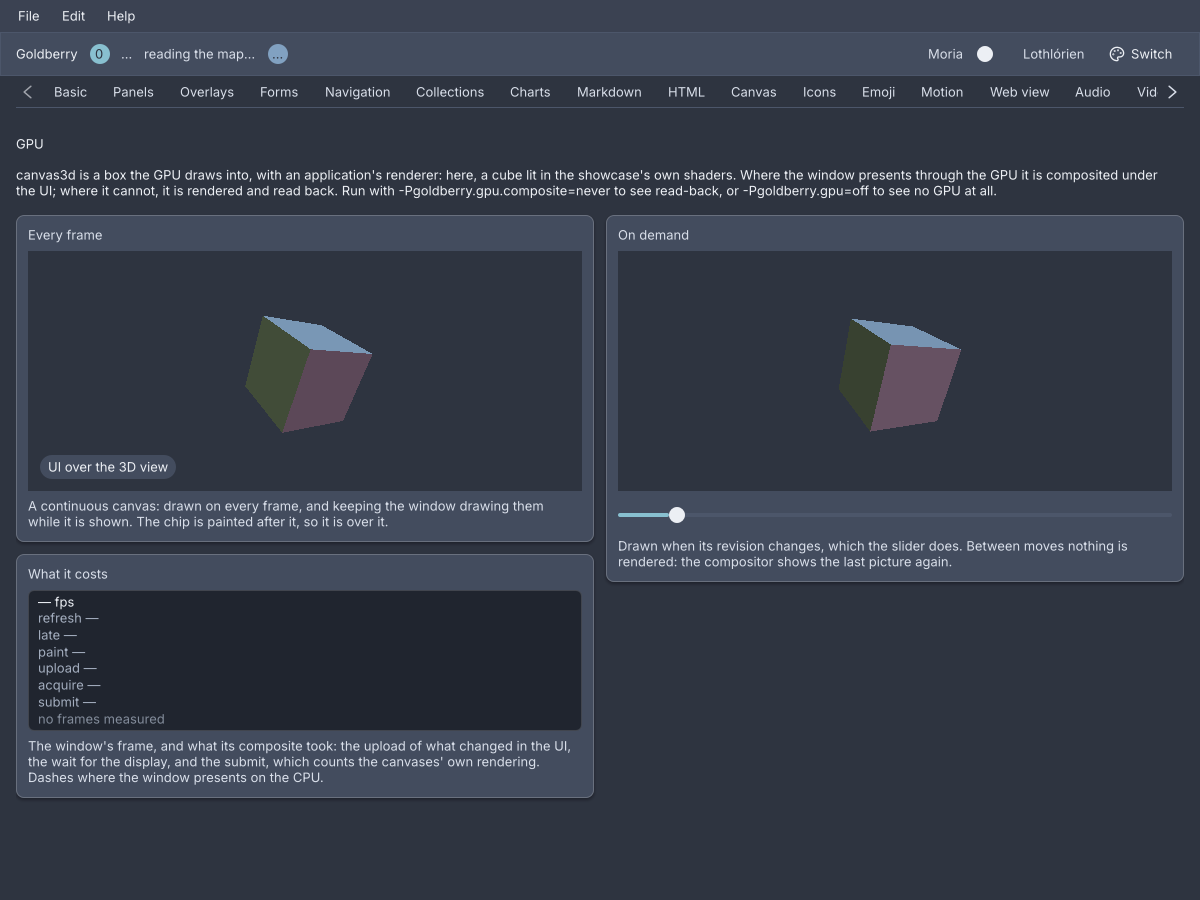
The showcase's GPU screen. The left cube spins on every frame, the right one turns when the slider moves.
What the module does to a window
The UI is painted by Blend2D on the CPU whatever the window presents through.
goldberry-gpu changes the last step. Put it on the module path and every
window presents its frame through SDL_GPU: the frame’s damage is uploaded to a
texture and drawn onto the window’s swapchain, on Metal, Vulkan or Direct3D 12.
Where that cannot be done, with no device, a refused claim or a popup, the
window presents on the CPU exactly as it did before
(ADR-0480).
The window says which, once per change:
[GPU] "Goldberry — showcase on Linux / amd64" presents through the GPU (vulkan)
Window.presentation() answers the same thing in code, as a Presentation.Gpu
with the driver’s name or a Presentation.Cpu with the reason, and
Window.onPresentationChange(handler) hears each change
(ADR-0492).
Two system properties set the policy:
| Property | Values | What it does |
|---|---|---|
goldberry.gpu | auto, off | off never touches the GPU. Every window stays on the CPU and a canvas3d shows a notice instead of a picture |
goldberry.gpu.composite | always, auto, never | always composites every window from its first frame. auto composites a window only while it shows GPU layers. never composites none and reads every layer back |
What the GPU path adds is GPU layers: opaque rectangles in the frame’s paint
order that the GPU fills and the UI is composited over. A window that cannot
composite reads a layer back into its frame instead, so the same tree draws
the same picture both ways
(ADR-0481).
canvas3d is one layer. A video-view is the other, when goldberry-media and
goldberry-gpu are both present
(ADR-0484).
canvas3d
A 3D view: a leaf sized by its stylesheet, whose picture an application’s
Canvas3dRenderer draws on the window’s device.
canvas3d renderer="cube" continuous=#true depth="d16"
import dev.goldberry.gpu.view.Canvas3d;

new Canvas3d(Cube.spinning()).continuous(true).depth(Canvas3d.Depth.D16);
new Canvas3d(viewer).revision(revision).withAttributes(Attributes.NONE.id("model"));
In markup the renderer is a named object the application registered, resolved
by renderer=. A node with no renderer to resolve against does not inflate, so
the sample above is a fragment.
When it is drawn. A continuous canvas is drawn on every frame and keeps the
window drawing frames while it is shown: a spinning model, a game. Otherwise it
is drawn once, then again when its size changes and when its revision does. A
model viewer that redraws when its camera moves rebuilds the widget with the
next revision, and between those the last picture is shown again and nothing is
rendered.
Where there is no GPU. With goldberry.gpu=off, with no device, or inside
an opacity group, the box is filled with --gb-canvas3d-unavailable and a
notice says why
(ADR-0482).
The renderer
public interface Canvas3dRenderer {
    void init(GpuDevice device);
    default void resize(PhysicalSize size) {}
    void render(GpuFrame frame, Canvas3dTarget target);
    void dispose();
}
init is called once, before the first render, with the window’s device.
resize follows it and runs again whenever the canvas’s size in physical pixels
changes. render runs for each frame the canvas is drawn. dispose runs when
the canvas leaves the tree, or before init on a new device. Every call is on
the UI thread, which is the device’s. The canvas keeps the renderer while it is
mounted and makes a new layer when the widget is rebuilt with another renderer
or depth.
The showcase’s cube is a renderer written as an application writes one:
public final class Cube implements Canvas3dRenderer {

    @Override
    public void init(GpuDevice device) {
        vertex = device.createShader(ShaderCode.load(ShaderStage.VERTEX, "cube.vert", 0, 1, Cube::resource));
        fragment = device.createShader(ShaderCode.load(ShaderStage.FRAGMENT, "cube.frag", 0, 0, Cube::resource));
        pipeline = device.createPipeline(PipelineSpec.builder(vertex, fragment, TextureFormat.B8G8R8A8_UNORM)
                .vertexBuffer(...)
                .build());
        mesh = device.createBuffer(BufferUsage.VERTEX, STRIDE * VERTICES);
    }

    @Override
    public void render(GpuFrame frame, Canvas3dTarget target) {
        frame.renderPass(target.colour(), Load.clear(0, 0, 0, 1), target.clearDepth(), pass -> {
            pass.bindPipeline(pipeline);
            pass.bindVertexBuffer(0, mesh);
            pass.pushVertexUniforms(0, transform(target.aspect(), target.seconds()));
            pass.draw(VERTICES);
        });
    }

    @Override
    public void dispose() {
        pipeline.close();
        mesh.close();
    }
}
GpuDevice makes textures, buffers, samplers, shaders and pipelines from
records, and beginFrame() starts a GpuFrame. A frame is a command buffer
recorded pass by pass: copyPass uploads into buffers and textures, and
renderPass draws into a target, with a Load for what happens first and an
optional DepthTarget. A pass is open only while its body runs. The toolkit
submits the canvas’s frame, and a frame closed without submit is discarded.
A RenderPass binds a pipeline, vertex and index buffers and fragment samplers,
pushes uniforms, and calls draw or drawIndexed. Misuse the API can see, a
closed resource or a draw with nothing bound, throws in Java before the driver
is reached. Everything is confined to the device’s thread
(ADR-0478).
The Canvas3dTarget is a colour texture at the canvas’s size in physical
pixels, a depth texture beside it when the canvas asked for one, and nanos,
the frame’s time since the canvas was first drawn. target.aspect() is what a
projection is made with, target.seconds() is what an animation is a function
of, and target.clearDepth() is the depth target cleared to the far plane. The
renderer covers every pixel of the colour texture, and its picture is opaque,
as every GPU layer is.
Shaders
Shaders are written in HLSL and compiled offline. The sources live in
src/main/shaders/*.hlsl, and ./gradlew :gpu:compileShaders runs DXC for
SPIR-V and DXIL and SPIRV-Cross for MSL, then commits the bytecode as resources
beside the code that loads them
(ADR-0476).
It is a task run on purpose, not part of build, because DXC and SPIRV-Cross
come with the Vulkan SDK and are too much to ask of every build. The task also
compiles the showcase’s own cube.vert.hlsl and cube.frag.hlsl.
ShaderCode.load(stage, name, samplers, uniformBuffers, lookup) reads
name.spv, name.dxil and name.msl through the caller’s own resource lookup,
and device.createShader(code) picks the format the device takes.
Attributes
| Attribute | Type | Default | What it does |
|---|---|---|---|
renderer | named Canvas3dRenderer | required | What draws the picture |
continuous | boolean | #false | Drawn on every frame, and keeps the window drawing them |
depth | none, d16, d32 | none | The depth target the renderer draws with. Anything else is refused |
revision | number | 0 | A value other than the last one drawn has an on-demand canvas drawn again |
id | string | none | The canvas’s id |
class | string | none | Classes on its box |
Children are refused.
Styling
The CSS type is canvas3d, sized like an image or a canvas by width and
height. It is a GPU layer, so it is opaque, what is painted after it is over
it, and a clip cuts it to a rectangle. Without a GPU the box is filled with
--gb-canvas3d-unavailable, and the notice is a message with the class
canvas3d-notice inside a stack with the class canvas3d-stage.
Keyboard
None. A canvas3d is not focusable.
Read more
- ADR-0475: SDL_GPU is bound for core and gpu and tested on the first thread
- ADR-0477: The GPU composites with SDL_GPU directly
- ADR-0478: The GPU API is confined, scoped and checked in Java
- ADR-0479: A window is composited through a seam core declares and gpu provides
- ADR-0481: GPU layers are placed in paint order and shown through a hole or read back
- ADR-0482: canvas3d is a GPU layer an application renders into
What is measured, and what is not yet
Everything above was built and measured on Metal, on one M1 Pro. Creating the device costs about 20 ms at the first frame there, and 190 to 320 ms on NVIDIA’s Vulkan driver on Linux (ADR-0480). A whole 2560 by 1600 frame costs 1.1 ms of CPU to composite against 2.65 ms for the window-surface present of the same frame, and a minute of 4K60 VP9 through a GPU layer shows all 3600 pictures where CPU present drops 1581 (ADR-0485).
On Linux the composited path has run on this project’s machine under X11 and nowhere else. Windows and Direct3D 12 wait for a host. The lane that would test it on every push, on lavapipe, has run and not yet reached a test (ADR-0503). A device lost mid-render shows black and does not fall back. The status page keeps the current list.