Collections
A list, a table and a tree: three widgets over a model the application owns, that select by id, report what the user chose, and never edit the data.
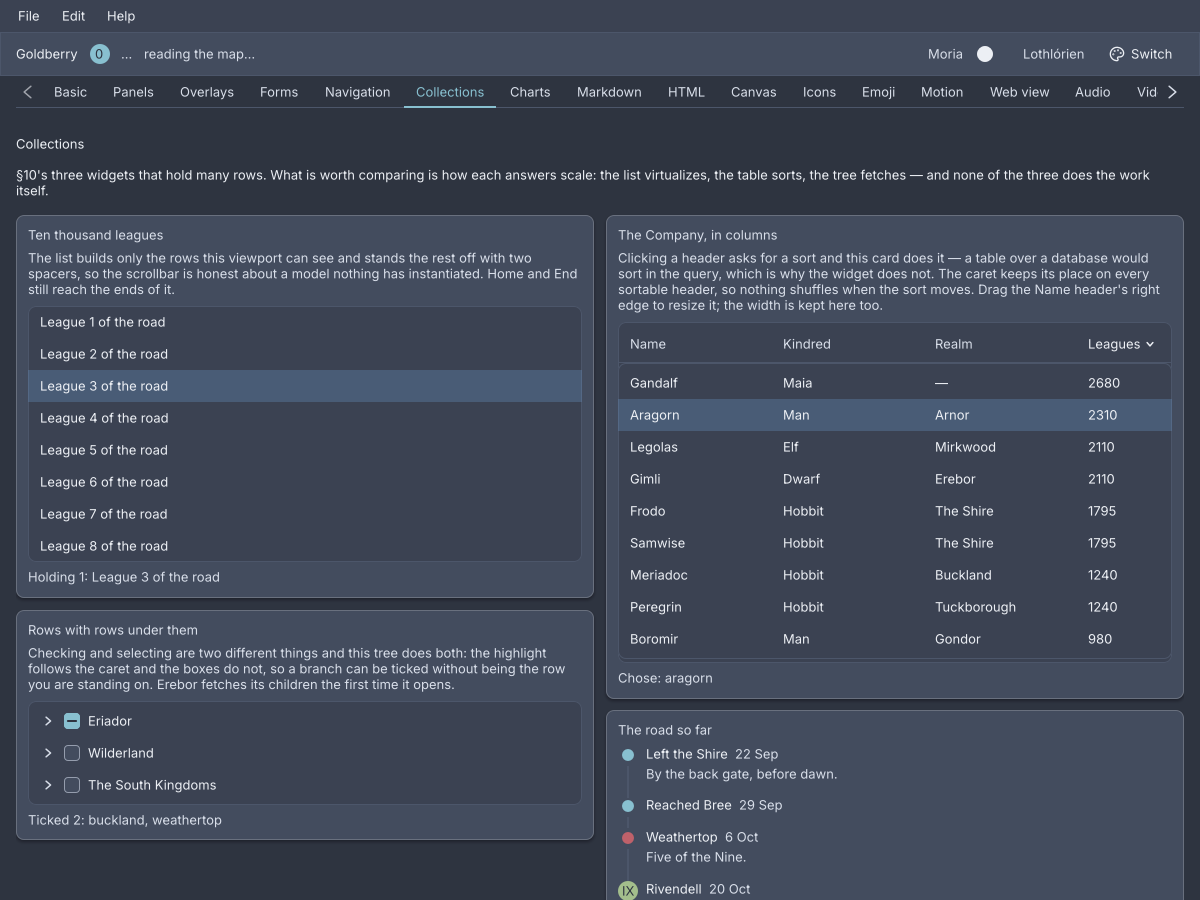
The Collections screen of the showcase, Nord dark.
Each of the three takes the application’s own type and a few functions that describe it: how to identify an item, how to draw it, what to call it. The widget holds no copy of the data. Selection is a set of ids the application holds and hands back in, and every change arrives as the whole new set (ADR-0063).
Important
A list, a table or a tree is built in Java. Markup can place one the model holds, with
bind=, but cannot describe one: an item factory is code (ADR-0367). Thekdlsamples below show the placing. The Java beside them is the widget.
list
A vertical list of rows, one per item, with a selection model and a keyboard.
list bind="app.road" id="road" class="sidebar"
@Bind("app.road") private ListView<String> road =
        ListView.of(Leagues.ROAD)
                .virtualized()
                .selection(Selection.MULTIPLE)
                .selected(chosen, this::choose);
ListView.of(List<String>) is the short form: the string is the id, the label
and the type-ahead text. The general constructor takes the application’s type
and two functions:
new ListView<>(walkers, Walker::id, w -> new Text(w.name()))
        .text(Walker::name)
        .selected(picked, this::pick);
identity names an item, and that name is what selection carries. factory
builds the row’s content, and any widget will do. text is optional and
powers type-to-select.
Rows are virtualized by row height. virtualized() reads
--gb-list-row-height from the cascade, so a compact density gets the right
pitch. virtualized(double) names one. The list then builds only the rows a
viewport can see, plus four either side, with a spacer above and below sized
from the rest, so the showcase scrolls ten thousand rows
(ADR-0213). A
list that is not virtualized builds every row.
Warning
A virtualized list’s
list-rowheight must be the pitch it was told. When a stylesheet makes them differ by more than half a pixel the list logs it once and the scroll range is wrong (ADR-0257).
Attributes
| Attribute | Type | Default | What it does |
|---|---|---|---|
bind | path | none | The ListView a model holds. Nothing bound draws nothing. |
id, class | string | Laid over the widget’s own id and classes. |
Nothing else is read, and children are ignored.
Java
| Method | What it does |
|---|---|
ListView.of(List<String>) | A list of strings, each its own id and label. |
new ListView<>(items, identity, factory) | The general form. |
selection(Selection) | NONE, SINGLE or MULTIPLE. Single is the default. |
selected(Set<String>, Consumer<Set<String>>) | The current selection and where to report the next. |
selected(String, Consumer<String>) | The same for a single selection. |
text(Function<T, String>) | What type-to-select matches. |
virtualized(), virtualized(double) | Build only the visible window. |
itemMenu(Function<T, String>) | A context-menu name per item. |
In MULTIPLE, a plain press replaces the selection, Ctrl toggles the row,
and Shift selects from the last plain press through to the row. What is
reported is the whole set, in the order it was chosen.
Styling
The CSS type is list. Each row is a list-row, and the virtual spacers are
list-spacer. A row matches :hover and :focus-visible, and carries the
class selected rather than a pseudo-class. The row height is
--gb-list-row-height, 32px, 26px at compact density.
Keyboard
| Key | Does |
|---|---|
Up, Down | move focus between rows, without selecting |
Enter | selects the focused row. Ctrl+Enter toggles, Shift+Enter ranges |
Home, End | the first and last item, widening the virtual window to reach them |
| letters | type-to-select, when text is set. One second between letters, repeat a letter to cycle |
A right-click selects the row it is over before the context menu opens, unless it is already selected (ADR-0224).
Read more
- ADR-0212: A list owns the models a tree borrowed
- ADR-0213: A virtual list is two spacers and a window
- ADR-0254: A build may ask the cascade for a number
- ADR-0367: A document places a list it cannot describe
table
A list with columns: one row per item, one cell per column, and a header that sorts by asking.
table bind="app.company" id="company"
new Table<>(sorted, Walker::id, List.of(
        Column.<Walker>of("name", "Name", Walker::name).sortable(true).resizable(true),
        Column.<Walker>of("realm", "Realm", Walker::realm).sortable(true).weight(2),
        Column.<Walker>of("leagues", "Leagues", w -> String.valueOf(w.leagues()))
                .sortable(true)
                .fixed(96)
))
    .sorted(sort, this::sortBy)
    .selection(Selection.MULTIPLE)
    .selected(picked, this::pick)
    .id("company");
A Column has a key, a header, a cell function and a width. Column.of
draws text, Column.widget draws any widget. weight(double) shares the
remaining width, fixed(double) takes pixels.
Sorting is reported, not performed. A press on a sortable header calls
onSort with the Sort the table would like next: the column, ascending, or
the same column flipped. The application sorts its items and rebuilds, and the
caret appears on the column sort names
(ADR-0214).
private void sortBy(Sort next) {
    setState(() -> sort = next);   // and sorted() orders the items by it
}
A resizable column has a grip after its header. Dragging it asks onResize
for a new width, and the application decides what the column becomes
(ADR-0361). The header stays
at the top while the rows scroll
(ADR-0360).
Attributes
| Attribute | Type | Default | What it does |
|---|---|---|---|
bind | path | none | The Table a model holds. Nothing bound draws nothing. |
id, class | string | Laid over the widget’s own. |
A column child in markup is the layout widget, not a column definition, and
is discarded.
Java
| Method | What it does |
|---|---|
new Table<>(items, identity, columns) | The table. |
sorted(Sort, Consumer<Sort>) | The current sort and where to report the next. null is model order. |
resized(BiConsumer<String, Double>) | Where a grip reports a column key and a width. |
selection, selected | As list. |
virtualized(double) | Build only the visible rows, at this pitch. |
Sort.by(column) is ascending. Sort.next(current, column) is what the header
asks for.
Styling
The CSS type is table. The header is a table-head of table-header cells,
each holding a table-label and, on the sorted column, a sort-caret; a
table-rule runs under it, and a table-grip sits after a resizable header.
Rows are the list’s list-row, each a table-cells of table-cell. A header
carries the classes sortable, sorted and ascending or descending, and
matches :hover and :focus-visible. The header height is
--gb-table-header-height, 36px, 30px at compact density.
Keyboard
Rows take what list takes: Up, Down, Enter, Home, End. A sortable
header is a Tab stop, and Enter or Space on it asks for the next sort. A
table has no type-to-select.
Read more
- ADR-0214: A table is a list with columns
- ADR-0360: An affix stays inside its container
- ADR-0361: A column is resized by asking
tree
A list that remembers what is open: nodes with children, a chevron on those that have or may have some, and the list’s selection models.
tree bind="app.lands" id="lands"
List<TreeNode> lands = List.of(
        TreeNode.of("eriador", "Eriador",
                TreeNode.leaf("shire", "The Shire"),
                TreeNode.leaf("bree", "Bree")),
        TreeNode.lazy("erebor", "Erebor",
                () -> List.of(TreeNode.leaf("dale", "Dale")))
);

new Tree(lands, selected, this::select)
        .checkable(Checkable.CASCADE)
        .checked(checked, this::check)
        .id("lands");
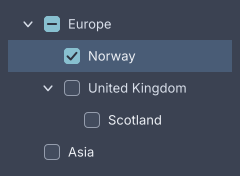
Checkable.CASCADE: a parent's box shows what its children say.
The model is a TreeNode. It has an id, a label and either a list of
children or a supplier of them. TreeNode.leaf has none, TreeNode.of has
them now, and TreeNode.lazy fetches them the first time the node opens. The
tree keeps which ids are open and what a supplier returned, so a rebuild with
the same ids keeps the same shape
(ADR-0184).
Checking and selecting are two different things. Selection is the list’s,
a set of ids reported whole. checkable(Checkable) adds a checkbox per node:
LEAF on leaves only, ANY on every node, CASCADE where a parent’s box
shows its children’s state and checking it checks them all. The checked set
is reported through checked(Set, Consumer) and never touches selection
(ADR-0210).
Attributes
| Attribute | Type | Default | What it does |
|---|---|---|---|
bind | path | none | The Tree a model holds. Nothing bound draws nothing. |
id, class | string | Laid over the widget’s own. |
There is no checkable= or node child in markup. Those are the model’s.
Java
| Method | What it does |
|---|---|
new Tree(roots, selected, onSelect) | Single selection of leaves only. |
anyNode(true) | Lets a parent be selected too. |
selection(Selection), selected(Set), onSelect(Consumer) | The list’s models. |
checkable(Checkable) | NONE, LEAF, ANY or CASCADE. |
checked(Set<String>, Consumer<Set<String>>) | The checked ids and where to report the next set. |
A tree is not virtualized: every visible row is built.
Styling
The CSS type is tree. Each row is a tree-row holding a tree-indent, a
tree-chevron, a tree-check when the tree is checkable, and a tree-label.
A row carries the classes expanded, selected and group, the last on a
row that cannot be selected, and matches :hover and :focus-visible. The
indent is 20px per level and the row height is --gb-list-row-height.
Keyboard
| Key | Does |
|---|---|
Up, Down | move focus between visible rows |
Right | opens a closed node, or moves to the first child of an open one |
Left | closes an open node, or moves to the parent |
Enter | selects, with Ctrl and Shift as the list has them |
Space | toggles the row’s checkbox |
Home, End | the first and last visible row |
* | opens every sibling of the focused row |
| letters | type-to-select over the visible rows |
The keyboard is the subject of ADR-0209. A click on the chevron opens or closes without selecting. A click on a parent that cannot be selected opens it.
Read more